<?xml version="1.0" encoding="utf-8"?><feed xmlns="http://www.w3.org/2005/Atom" ><generator uri="https://jekyllrb.com/" version="4.4.1">Jekyll</generator><link href="https://wlplugin.halirutan.de/feed.xml" rel="self" type="application/atom+xml" /><link href="https://wlplugin.halirutan.de/" rel="alternate" type="text/html" /><updated>2025-06-12T17:44:40+02:00</updated><id>https://wlplugin.halirutan.de/feed.xml</id><title type="html">Wolfram Language Plugin</title><subtitle>Wolfram Language Plugin for JetBrains IDEs.</subtitle><author><name>Patrick Scheibe, PhD</name></author><entry><title type="html">Increased Subscription Pricing</title><link href="https://wlplugin.halirutan.de/pricing-changes/" rel="alternate" type="text/html" title="Increased Subscription Pricing" /><published>2022-10-21T00:00:00+02:00</published><updated>2022-10-26T00:00:00+02:00</updated><id>https://wlplugin.halirutan.de/pricing-changes</id><content type="html" xml:base="https://wlplugin.halirutan.de/pricing-changes/"><![CDATA[<p>Since the introduction the Wolfram Language Plugin to the JetBrains Marketplace in 2019, over 3 years ago, the initial
pricing was not adjusted.
With 3 Euro/month for a personal and 12 Euro/month for a commercial license, it was also very modest to begin with.
From the beginning, we strongly supported teachers, students, scientist, or people working on open-source projects, 
who can get the plugin for free.
Loyal customers are rewarded with up to 40% discounts on their subscription fees when they renew their licenses.
Finally, when JetBrains’ commission fee went up from 5% to 15% after the first year, the pricing was again not adjusted.</p>

<p>I am at a point where I need to increase subscription prices.
I tried to approach this from different angles, but eventually settled for a practical way to look at it:
What services do I use personally and how much do they cost?</p>

<ul>
  <li>Zoom: ~12 Euro/month</li>
  <li>Grammarly: 12 Euro/month</li>
  <li>Adobe Photoshop: 23 Euro/month</li>
  <li>Midjourney: 30 Euro/month</li>
  <li>Adobe Lightroom: 12 Euro/month</li>
  <li>Minecraft Realm for the kids: 7 Euro/month</li>
  <li>Netflix: 18 Euro/month</li>
</ul>

<p>The median of above subscription fees is 12 Euro.
It will be the base for the new pricing scheme and compared to the current personal license costs of 3 Euro per month gives a factor of 4.
Therefore, in the next weeks, the pricing of Wolfram Language Plugin will be adjusted to:</p>

<ul>
  <li><strong>12 Euro/month</strong> or <strong>120 Euro/year</strong> for a personal license.</li>
  <li><strong>48 Euro/month</strong> or <strong>480 Euro/year</strong> for a commercial license.</li>
</ul>

<p>Current customers will <strong>not lose</strong> their 20% or 40% discounts on the new prices!</p>

<p>I understand that price increases are something none of us likes and I thank you for your understanding.
If you have any questions about the changes or need clarification, please feel free to reach out using the following email:</p>

<div class="language-plaintext highlighter-rouge"><div class="highlight"><pre class="highlight"><code>Uncompress[
  "1:eJxTTMoPCpZlYGAoLi0oyC8qcSjPKcgpTc/M08tIzMksKi1JzNNLSQUA8dUNcQ=="
]
</code></pre></div></div>]]></content><author><name>Patrick Scheibe, PhD</name></author><summary type="html"><![CDATA[In the upcoming weeks, prices of the Wolfram Language Plugin will increase]]></summary></entry><entry><title type="html">Version 2020.2 is out</title><link href="https://wlplugin.halirutan.de/version-20202/" rel="alternate" type="text/html" title="Version 2020.2 is out" /><published>2020-08-09T00:00:00+02:00</published><updated>2020-08-19T00:00:00+02:00</updated><id>https://wlplugin.halirutan.de/version-20202</id><content type="html" xml:base="https://wlplugin.halirutan.de/version-20202/"><![CDATA[<p>The new 2020.2 release of the Wolfram Language Plugin (WLP) is out, and some of you might wonder if they missed the
post about the 2020.1 version.
No, you did not.
I had a draft of this post ready for a long time but then, something unexpected happened to all of us which had a
substantial effect on our daily routines.
Therefore, let’s call this the “Wolfram Language Plugin version 2020 post” that had to wait until version 2020.2.
I’d like to highlight some old and new features that you might not know did exist.</p>

<p>Firstly, the 2020 release comes with support for the Wolfram Language 12.1 and includes all its functions, options and documentation
right at your fingertips.
The extraction of all this information from a new version of Mathematica is always a challenge since you need to access
options, usages, and attributes for thousands of built-in symbols and bring everything into a consistent format.
My friend <a href="http://szhorvat.net/pelican/">Szabolcs Horvát</a> helped quite a bit in this endeavor, and we were able to almost
completely rewrite how we can automatically extract information about Mathematica’s symbols.
The package is <a href="https://github.com/halirutan/Wolfram-IntelliJ-Tools">available on GitHub</a> and if you’re interested how
you can turn a Mathematica usage message into HTML, you should have a look at it.</p>

<p>If you haven’t seen it already, you can display the usage message of your own functions by using “Quick Documentation”
(<code class="language-plaintext highlighter-rouge">Ctrl</code> + <code class="language-plaintext highlighter-rouge">Q</code> on Linux and Windows) when your cursor is over any usage of the function.
Note that the package-wide (and across packages) resolution of symbols also relies on the existence of usage messages.
So when you have defined a function with a usage message in file A and you are using it in a file B, you can navigate
to the definition by pressing <code class="language-plaintext highlighter-rouge">Ctrl</code> + <code class="language-plaintext highlighter-rouge">B</code>.</p>

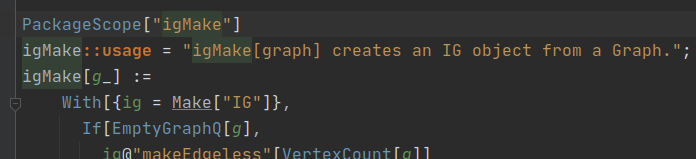
<p>Another feature that is mostly unknown is that Wolfram introduced an alternative and especially for beginners easier way
to define which symbols in a package are private, which are package-wide symbols, and which will be exported for direct
use to the end-user. I’m not going into details here, but you can read 
<a href="https://mathematica.stackexchange.com/q/184711/187">this StackExchange post</a> or look into the package 
<code class="language-plaintext highlighter-rouge">SystemFiles/Components/HTTPHandling/Main.m</code> in your Mathematica 12.1 installation for examples.
To give you the gist: It simplifies the handling of contexts inside packages by introducing static directives <code class="language-plaintext highlighter-rouge">Package</code>,
<code class="language-plaintext highlighter-rouge">PackageScope</code>, and <code class="language-plaintext highlighter-rouge">PackageExport</code> that you can use to define which symbols are package-private or exported.
The plugin recognizes this new package format and provides highlighting, autocompletion and resolving of the arguments
you provide to the new package directives.</p>

<p><a href="/assets/images/version-2020.2/package.png"><img src="/assets/images/version-2020.2/package.png" alt="New Package Style" class="align-center" /></a></p>

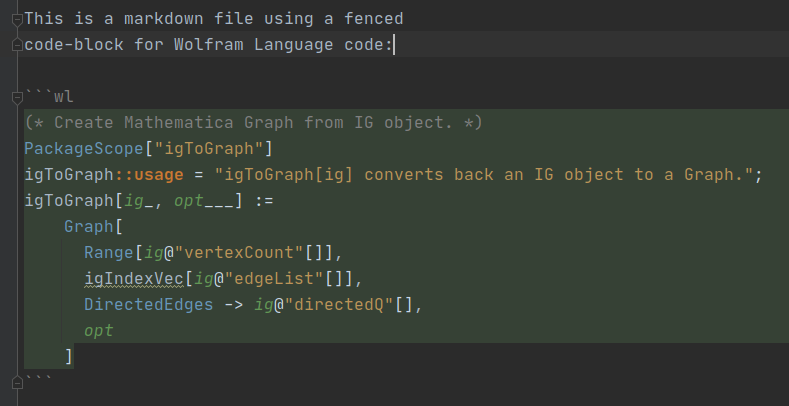
<p>Another thing you might have missed is that the WLP integrates into IntelliJ’s markdown capabilities and lets you
use fenced codeblocks that are tagged with <code class="language-plaintext highlighter-rouge">wl</code> or <code class="language-plaintext highlighter-rouge">mathematica</code>. That means, you get syntax highlighting for Wolfram
Language code directly within a markdown file.
As you can see in the screenshot below, it supports advanced syntax highlighting like coloring of local variables.</p>

<p><a href="/assets/images/version-2020.2/markdown.png"><img src="/assets/images/version-2020.2/markdown.png" alt="Markdown Support" class="align-center" /></a></p>

<p>Have you tried the “Show Parentheses” feature you find in the Wolfram Language menu entry? It displays your code with
additional parentheses and lets you quickly see the order of evaluation.
This is a temporary display that you can exit by pressing <code class="language-plaintext highlighter-rouge">Esc</code>.</p>

<p><a href="/assets/images/version-2020.2/parens.png"><img src="/assets/images/version-2020.2/parens.png" alt="Markdown Support" class="align-center" /></a></p>

<p>Other small improvements include that you can now open notebooks directly from within IDEA, and it will use your operating
system to find the Mathematica installation used for opening the file.
The folding of code was also extended to more places since users seem to love folding their code.</p>

<p>In the end, I would like to clear things about licencing up once more since I <em>heard</em> that a 
few users were disappointed that the WLP is not open-source anymore.
Since last year, the WLP is available on the Jetbrains Marketplace, and you need a free, or a paid license to use it.
That was a step I planned for a long time and I <a href="/plugin-on-marketplace">explained in detail why it was necessary</a>:</p>

<blockquote>
  <p>why change the Wolfram Language Plugin from a free, open-source project to a paid service?
  Back in 2012, I was hoping it can be a community project with several people working on the code.
  However, it is 2019, I’m still working alone, and it’s safe to say that this plan has failed.
  Maintaining code, developing new features, and taking care of the website and user communication takes a good portion of
  my free time.
  If the revenue from the subscriptions helps me to pay the bills, I can set apart more official time to work on the 
  plugin.
  If this works out, the users will benefit because when more time is spent on the plugin, the quality of features and
  documentation will increase.</p>
</blockquote>

<p>With over 80k downloads, and the plugin working on 16 of Jetbrain’s major IDEs, it should be obvious maintaining
the WLP is more than just a small side-project.</p>

<p>Also, some users have been confused, because there was no need for a license until the end of 2019 although the plugin
was already on the Jetbrains Marketplace.
The reason is that the Marketplace wasn’t ready for IntelliJ Community products, and there were two choices:
Give the WLP for free for the time being or don’t allow it on IntelliJ Community products.
I decided for the first option so that users of, e.g. Community IDEA could use the WLP on an “extended trial”.</p>

<p>The WLP specifically targets package developers who build polished packages that they usually want to distribute either
open-source or professionally. Open-source developers, students, people from academia, or teachers working in a classroom can get
a <a href="/docs/licensing/#free-license-for-open-source-developers-students-and-educators-working-in-academia">free license for the WLP</a>.
Therefore, the paid licenses are for professionals or companies who make money with their work.
By sharing some of their revenue, I get something back for my time and with paying customers, it’s my obligation to set
aside time for maintaining the plugin. It’s a win-win for everyone.</p>]]></content><author><name>Patrick Scheibe, PhD</name></author><summary type="html"><![CDATA[A few days late, the Wolfram Language plugin for IntelliJ 2020.2 is released]]></summary></entry><entry><title type="html">Summarizing the year 2019</title><link href="https://wlplugin.halirutan.de/end-of-year-2019/" rel="alternate" type="text/html" title="Summarizing the year 2019" /><published>2019-12-30T00:00:00+01:00</published><updated>2019-12-30T00:00:00+01:00</updated><id>https://wlplugin.halirutan.de/end-of-year-2019</id><content type="html" xml:base="https://wlplugin.halirutan.de/end-of-year-2019/"><![CDATA[<p>The year 2019 is coming to an end, and I’d like to summarize what happened in the past months and give an overview of the
Wolfram Language Plugin (WLP) usage statistics.
When I talked to users of the WLP, I realized that there has been quite some confusion about the licensing of the Wolfram Language Plugin.
Let’s recap quickly why the situation was so confusion to many people.
In the first months of 2019, Jetbrains published the first version of the Jetbrains Marketplace which allows 3rd-party 
developers like myself to license their plugins to users with paid and free subscriptions.
Bringing the WLP to the Marketplace was a necessary step, and I have written in detail why the MLP as an open-source community
project failed in <a href="/plugin-on-marketplace/">this post</a>.</p>

<p>However, when the Marketplace went online, many features were still work-in-progress, and the framework that manages licenses was only
available on Ultimate products (IDEA Ultimate, PyCharm Professional, etc).
Therefore, right from the beginning, all users of Ultimate IDEs needed to have a valid license for the WLP to use it.</p>

<p>For all the free Jetbrains Community products, license management was still under development which meant I could either turn the support
for Community products off entirely or leave everything freely accessible for the time being.
I chose the latter option and users of Jetbrains Community products could get the Wolfram Language Plugin and all updates in an 
“extended trial period” as long as Jetbrains needed to bring license-checks to these IDEs.</p>

<p>Shortly before the 24th of December, Jetbrains made a Christmas gift to all its 3rd-party plugin developers by finally
implementing support for Marketplace licensing on Community products.
That means that starting now, everyone who wants to use the Wolfram Language Plugin will need to get a license.
I have given all details about which paid and free license-options exist <a href="/docs/licensing/">in the documentation</a>.</p>

<p>Although there was no requirement to have a license until now, some users still chose to support the plugin development
directly by subscribing to one of the licensing options.
Basically right after the Marketplace went online, the WLP had a steady stream of people interested
in getting a license for it.
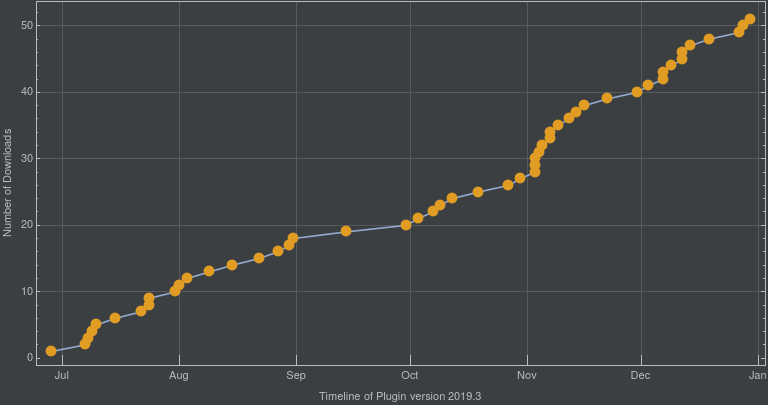
Here is a plot which shows the accumulated number of licenses from when the Marketplace was available:</p>

<p><a href="/assets/images/end-of-year-2019/licensingDates.png"><img src="/assets/images/end-of-year-2019/licensingDates.png" alt="New File" class="align-center" /></a></p>

<p>As you can see, there was a bit of a dry spell during September and a big bump during November.
I guess the increase of licenses in November can be attributed to 
<a href="https://www.twitch.tv/videos/501211373?t=01h31m30s">Stephen Wolfram mentioning the plugin during his keynote talk</a>
at the Wolfram Technology Conference earlier in October.</p>

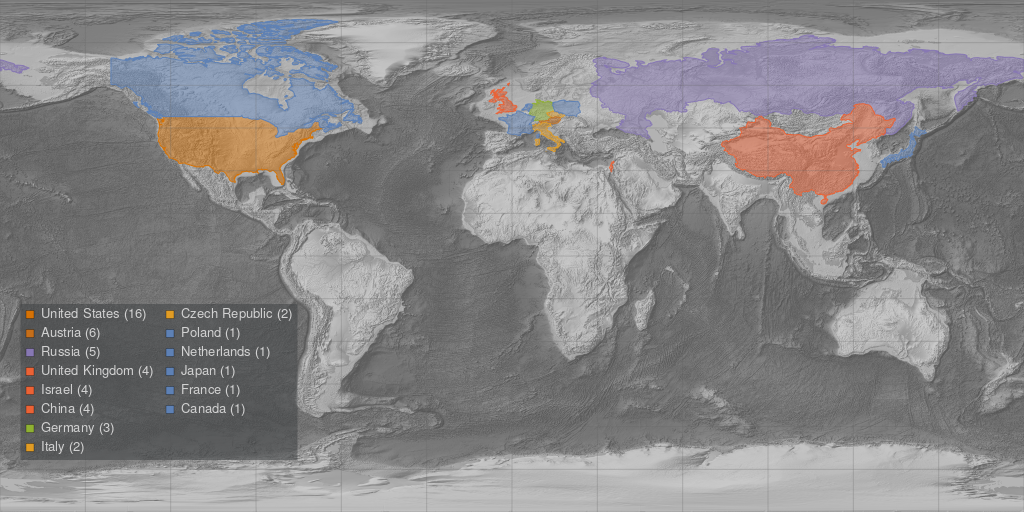
<p>What I was also interested in is where the plugin users that have a license come from.
Therefore, I created a location map that shows where the licensees are located and colorized countries depending on the 
number of licenses:</p>

<p><a href="/assets/images/end-of-year-2019/sales.png"><img src="/assets/images/end-of-year-2019/sales.png" alt="New File" class="align-center" /></a></p>

<p>As you can see, most of them are from the US which was to be expected with Wolfram Research having their headquarters there.
Very surprising to me and absolutely awesome is that there are Wolfram Language Plugin users in Isreal.
Overall, there are currently 51 users with an official paid or free license, and it might be interesting to see how this relates to the downloads
of the Wolfram Language Plugin.</p>

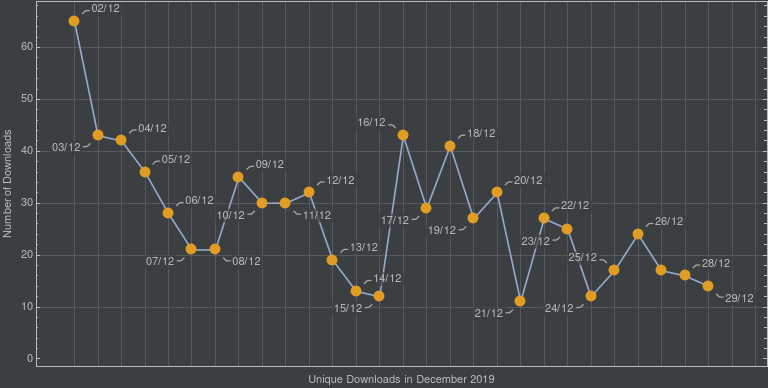
<p>Below you find the exact statistics for <em>unique</em> downloads of the plugin version 2019.3 which came out on 2nd of December 2019.
Here, <em>unique</em> means that downloading the plugin several times is only counted once.</p>

<p><a href="/assets/images/end-of-year-2019/downloads.png"><img src="/assets/images/end-of-year-2019/downloads.png" alt="New File" class="align-center" /></a></p>

<p>As expected there is a big bump right after publishing the version when all existing users update their WLP.
After that, it usually slowly decreases to a constant number of downloads from new people that want to test the WLP.
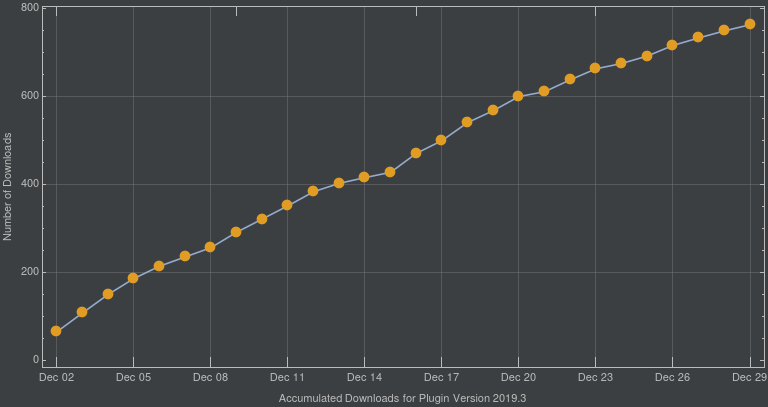
The accumulated download statistics for WLP 2019.3 looks like this:</p>

<p><a href="/assets/images/end-of-year-2019/accumulatedDownloads.png"><img src="/assets/images/end-of-year-2019/accumulatedDownloads.png" alt="New File" class="align-center" /></a></p>

<p>Overall, we have about 750 downloads for version 2019.3 in 28 days with a median of 27 downloads per day.
For such a niche product that targets mostly Mathematica package developers, I guess this is not too bad.</p>

<p>So what’s the plan for 2020? We have <a href="https://github.com/halirutan/Wolfram-Language-IntelliJ-Plugin-Archive/issues">some issues</a>
that require attention and while most of them are non-critical, there are interesting points for improving the MLP.
The documentation on the website, however, is still in a rudimentary state, and I will make it my New Year’s resolution
to improve it.
See you all in the next decade, and I hope every one of you has a nice New Year’s Eve.</p>]]></content><author><name>Patrick Scheibe, PhD</name></author><summary type="html"><![CDATA[The year 2019 is coming to an end, and I'd like to summarize what happened in the past months.]]></summary></entry><entry><title type="html">What’s new in version 2019.2</title><link href="https://wlplugin.halirutan.de/new-in-2019.2.1/" rel="alternate" type="text/html" title="What’s new in version 2019.2" /><published>2019-08-01T00:00:00+02:00</published><updated>2019-08-01T00:00:00+02:00</updated><id>https://wlplugin.halirutan.de/new-in-2019.2.1</id><content type="html" xml:base="https://wlplugin.halirutan.de/new-in-2019.2.1/"><![CDATA[<p>Several improvements come with version 2019.2. 
Many happen in the background, but there are also some new features in this version.
Here is what’s new..</p>

<h2 id="reinstate-support-for-ides-like-pycharm-clion-webstorm-">Reinstate support for IDE’s like PyCharm, CLion, WebStorm, …</h2>

<p>In version 2019.2, the IntelliJ API changed quite a bit. In order to support not only IntelliJ IDEA, but other IDE’s
as well, some code and the dependencies on IDEA classes needed to be fixed.
As some of you might have experienced, I did not succeed doing so in the first version of 2019.2.
However, last night, I published an updated version 2019.2.1 which should now be compatible with all of the main IntelliJ-based
products.</p>

<p>To give you a glimpse behind the scenes why this is necessary at all: IntelliJ IDEA is full featured and supports many
things that are not part of other IDE’s. For instance, the module-system that lets you bundle logical parts of your code might
 not be part of other IDE’s.
To make the plugin work in, e.g. PyCharm, these dependencies must now be marked as optional which means that I had to
analyse the plugin code and find out which of the features are problematic.</p>

<p>Since this was also new to me, it took some time to understand the exact workflow.
With version 2019.2.1, everything should now be set-up and the plugin will be as usual available for all IntelliJ-based
IDE’s.</p>

<h2 id="completion-provider-for-static-string-arguments">Completion provider for static string arguments</h2>

<p>One nice feature request was the support of defined string arguments.
That means, if you have a function that takes strings as accessor to select certain actions, you can now use the new completion
provider to insert them automatically. Here is an example</p>

<div class="language-wl highlighter-rouge"><div class="highlight"><pre class="highlight"><code><span class="nv">colorFunc</span><span class="p">[</span><span class="nv">x</span><span class="o">_?</span><span class="nb">NumericQ</span><span class="p">]</span><span class="w"> </span><span class="o">:=</span><span class="w"> </span><span class="bp">With</span><span class="p">[{</span><span class="nv">xx</span><span class="w"> </span><span class="o">=</span><span class="w"> </span><span class="nb">Mod</span><span class="p">[</span><span class="nv">x</span><span class="o">,</span><span class="w"> </span><span class="m">1</span><span class="p">]}</span><span class="o">,</span><span class="w"> </span><span class="nb">Blend</span><span class="p">[{</span><span class="nb">Red</span><span class="o">,</span><span class="w"> </span><span class="nb">Blue</span><span class="o">,</span><span class="w"> </span><span class="nb">Green</span><span class="p">}</span><span class="o">,</span><span class="w"> </span><span class="nv">x</span><span class="p">]]</span><span class="o">;</span><span class="w">
</span><span class="nv">colorFunc</span><span class="p">[</span><span class="s">"Description"</span><span class="p">]</span><span class="w"> </span><span class="o">:=</span><span class="w"> </span><span class="s">"A color-scheme of the 3 basic color red, green, and blue"</span><span class="o">;</span><span class="w">
</span><span class="nv">colorFunc</span><span class="p">[</span><span class="s">"Colors"</span><span class="p">]</span><span class="w"> </span><span class="o">:=</span><span class="w"> </span><span class="p">{</span><span class="nb">Red</span><span class="o">,</span><span class="w"> </span><span class="nb">Blue</span><span class="o">,</span><span class="w"> </span><span class="nb">Green</span><span class="p">}</span><span class="o">;</span><span class="w">
</span><span class="nv">colorFunc</span><span class="p">[</span><span class="s">"Panel"</span><span class="p">]</span><span class="w"> </span><span class="o">:=</span><span class="w"> </span><span class="nb">Panel</span><span class="p">[</span><span class="nb">Row</span><span class="o">@</span><span class="nb">Table</span><span class="p">[</span><span class="nv">colorFunc</span><span class="p">[</span><span class="nv">x</span><span class="p">]</span><span class="o">,</span><span class="w"> </span><span class="p">{</span><span class="nv">x</span><span class="o">,</span><span class="w"> </span><span class="m">0</span><span class="o">,</span><span class="w"> </span><span class="m">1</span><span class="o">,</span><span class="w"> </span><span class="m">.1</span><span class="p">}]]</span><span class="w">
</span></code></pre></div></div>

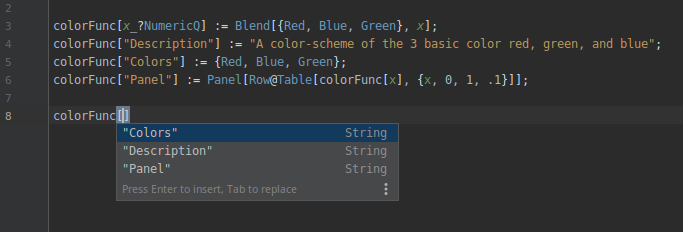
<p>When coding something like this, one might forget which strings were used to access certain information.
With the new smart completion, you can hit <code class="language-plaintext highlighter-rouge">Ctrl</code>+<code class="language-plaintext highlighter-rouge">Shift</code>+<code class="language-plaintext highlighter-rouge">Space</code> inside the brackets of <code class="language-plaintext highlighter-rouge">colorFunc</code> and you
will get a pop-up window that lets you insert available string arguments</p>

<p><a href="/assets/images/version-2019.2.1/string-completion.png"><img src="/assets/images/version-2019.2.1/string-completion.png" alt="String Completion" class="align-center" /></a></p>

<p>At the moment, this feature is not particularly clever. It simply collects all string arguments from usages of the function.
Also, it uses only a basic insert handler, you it doesn’t work correctly, if you already opened the string quotes.
Best to use it, when you haven’t typed anything at the place where you want to insert the string.
Simply hit <code class="language-plaintext highlighter-rouge">Ctrl</code>+<code class="language-plaintext highlighter-rouge">Shift</code>+<code class="language-plaintext highlighter-rouge">Space</code> and insert the argument.</p>

<h2 id="support-for-wolfram-script-files">Support for Wolfram Script files</h2>

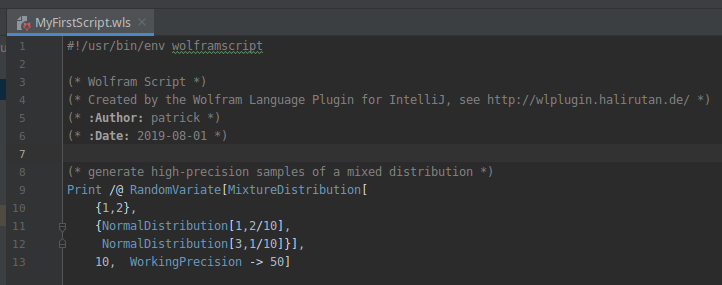
<p>Support for Wolfram Language Script was added. In detail this means, you can (a) create <code class="language-plaintext highlighter-rouge">.wls</code> files and they are recognized
by the plugin and (b) the shebang which is part of shell-scripts is parsed as a comment:</p>

<p><a href="/assets/images/version-2019.2.1/wolfram-script.png"><img src="/assets/images/version-2019.2.1/wolfram-script.png" alt="New File" class="align-center" /></a></p>

<h2 id="several-fixes-for-creating-files-with-template-code">Several fixes for creating files with template code</h2>

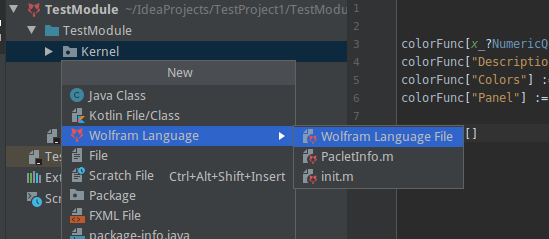
<p>In the past, some users complained that the entry for new Wolfram files in the pop-up menu is near the bottom.
I have reworked this whole feature and now, when you go to your file tree and press <code class="language-plaintext highlighter-rouge">Alt</code>+<code class="language-plaintext highlighter-rouge">Insert</code>, you have the
Wolfram entry near the top.
Additionally, you can insert standard files like the <code class="language-plaintext highlighter-rouge">PacletInfo.m</code> directly from the new menu</p>

<p><a href="/assets/images/version-2019.2.1/new-file.png"><img src="/assets/images/version-2019.2.1/new-file.png" alt="New File" class="align-center" /></a></p>

<p>Finally, a bug that didn’t allow you to create <code class="language-plaintext highlighter-rouge">.wl</code> files (they were created as <code class="language-plaintext highlighter-rouge">.wl.m</code> files) is fixed now.
So when you create a Wolfram file, you have two choices:</p>

<ol>
  <li>you can simply give the name without an extension and the plugin will append <code class="language-plaintext highlighter-rouge">.m</code> to files, <code class="language-plaintext highlighter-rouge">.mt</code> to tests, and <code class="language-plaintext highlighter-rouge">.wls</code> to Wolfram Script files</li>
  <li>you specify one of valid extensions explicitly (<code class="language-plaintext highlighter-rouge">.m</code>, <code class="language-plaintext highlighter-rouge">.wl</code>. <code class="language-plaintext highlighter-rouge">.mt</code>, <code class="language-plaintext highlighter-rouge">.wlt</code>, <code class="language-plaintext highlighter-rouge">.wls</code>)</li>
</ol>]]></content><author><name>Patrick Scheibe, PhD</name></author><summary type="html"><![CDATA[The Wolfram Language Plugin version 2019.2 is out! Here, we give a quick overview of what changed and what's new.]]></summary></entry><entry><title type="html">The new Wolfram Language Plugin Version 2019</title><link href="https://wlplugin.halirutan.de/plugin-on-marketplace/" rel="alternate" type="text/html" title="The new Wolfram Language Plugin Version 2019" /><published>2019-07-09T00:00:00+02:00</published><updated>2019-07-10T00:00:00+02:00</updated><id>https://wlplugin.halirutan.de/plugin-on-marketplace</id><content type="html" xml:base="https://wlplugin.halirutan.de/plugin-on-marketplace/"><![CDATA[<p>The Wolfram Language Plugin for IntelliJ IDEs has come a long way since its idea was born in 2012, almost seven years
 ago.
When I began, I envisioned it as a community project with at least a handful of developers who team up and work together.
However, I knew from the start that there is a good chance this plan is too ambitious because the IntelliJ SDK is
massive and working with it means to read a good deal of its code to understand how to use it.
Additionally, such a plugin needs to be written in Java and requires quite some patience to investigate the syntactical
quirks of the Wolfram Language.</p>

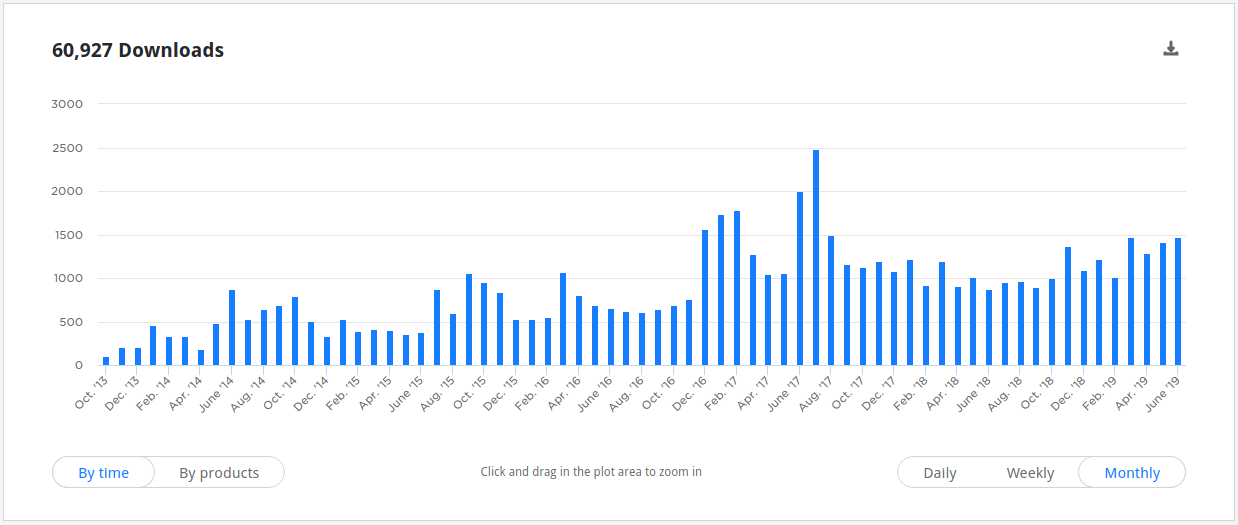
<p>Although the development remained a one-person job, the Wolfram Language Plugin was surprisingly well-received by its users.
It was downloaded over 60.000 times, and it is used in large packages like
<a href="https://github.com/szhorvat/IGraphM">IGraphM by Szabolcs Horvat</a> successfully.
Currently, the Wolfram Language Plugin has around 1000 downloads per month, and I’m glad that its users like it.</p>

<p><a href="/assets/images/marketplace/stats.png"><img src="/assets/images/marketplace/stats.png" alt="Download Statistics" /></a></p>

<p>Today, I’m happy to announce that the 
<a href="https://plugins.jetbrains.com/plugin/7232-wolfram-language/versions">next version of the Wolfram Language Plugin</a> 
is available for IntelliJ platform based products versions 2019.1.
That means it works for current versions of IntelliJ IDEA, PyCharm, CLion, 
<a href="https://plugins.jetbrains.com/plugin/7232-wolfram-language/update/64892">and others</a>.
From now on, the plugin will also be available through the new
<a href="https://plugins.jetbrains.com/marketplace">JetBrains Marketplace</a> which was initially released earlier this month
and will be polished in the upcoming weeks.</p>

<h2 id="the-jetbrains-marketplace">The JetBrains Marketplace</h2>

<p>Like iTunes or the Google Play store, the 
<a href="https://plugins.jetbrains.com/marketplace">JetBrains Marketplace</a> allows 3rd party developers to license their plugins 
and get revenue from user’s subscriptions.
The advantage for developers like me is that everything will (soon) be entirely integrated into the IntelliJ ecosystem,
making a lot of things easier.
In particular, this means JetBrains handles licensing and user-management, which will also come to the advantage of
the end-user. Installing and updating plugins will be as easy as before.</p>

<p>But why change the Wolfram Language Plugin from a free, open-source project to a paid service?
Back in 2012, I was hoping it can be a community project with several people working on the code.
However, it is 2019, I’m still working alone, and it’s safe to say that this plan has failed.
Maintaining code, developing new features, and taking care of the website and user communication takes a good portion of
my free time.
If the revenue from the subscriptions helps me to pay the bills, I can set apart more official time to work on the 
plugin.
If this works out, the users will benefit because when more time is spent on the plugin, the quality of features and
documentation will increase.
In the following, I will answer the most pressing questions.</p>

<h3 id="who-has-to-pay-how-much">Who has to pay how much?</h3>

<p>There will be a subscription fee for 
<a href="https://plugins.jetbrains.com/plugin/7232-wolfram-language/pricing#edition=personal">commercial and private licenses</a>.
So when you use the plugin to develop projects that you don’t share as open source, or you use it within your business,
you have to pay a subscription fee.
I have chosen a very moderate pricing scheme of 3 Euro per month for private and 12 Euro per month for business licenses.
If you pay for one year upfront, the fee will only be reduced to 10 times the monthly fee, i.e. 30 Euros and 120 Euros
per year respectively.</p>

<h3 id="will-there-be-free-licenses">Will there be free licenses?</h3>

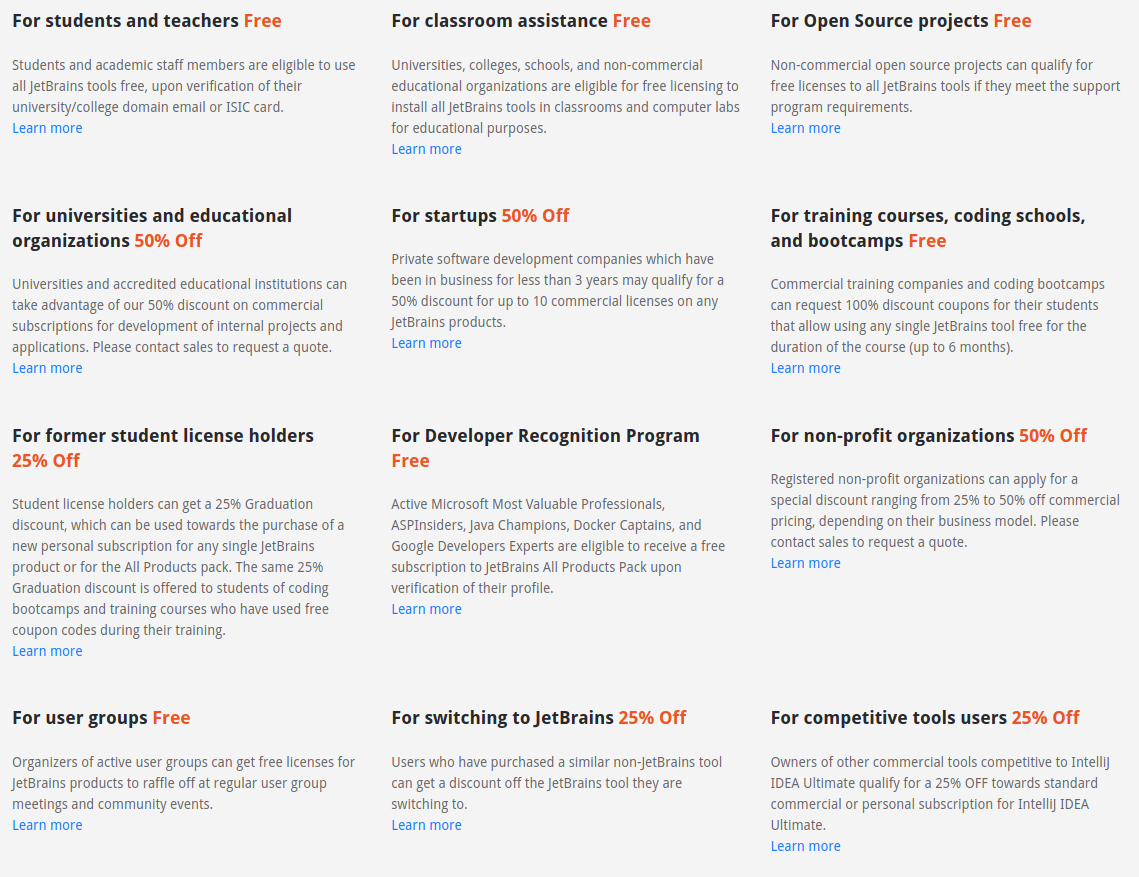
<p>Yes. When the JetBrains Marketplace is finalized, you will be able to apply for many special offers which include free
licenses for open-source projects, students, teachers, training courses, etc.
Additionally, there will be reduced offers for a wide range of other uses and, of course, there is a free 30-day trial.
To sum it up, the Wolfram Language Plugin will support
<a href="https://www.jetbrains.com/idea/buy/#discounts?billing=yearly">all special offers</a> that are also available for IntelliJ
IDEA.</p>

<p><a href="/assets/images/marketplace/specialOffers.png"><img src="/assets/images/marketplace/specialOffers.png" alt="Download Statistics" /></a></p>

<h3 id="what-is-the-current-status">What is the current status?</h3>

<p>The JetBrains Marketplace is not finalized yet and things like applying for an open-source license are still worked on.
At the moment, the licensing works for IntelliJ IDEA Ultimate only. I have not implemented any countermeasures for other
platforms, and you can use the Wolfram Language Plugin on other supported IDEs for free for the time being.
I estimate it will take a couple of months for JetBrains to finalize the Marketplace for all products and until 
then, I would be delighted if as many people as possible try and test the Wolfram Language Plugin.</p>

<p>There will probably some more bumps along the road in the next weeks, so please be patient with me if we hit any.
In the meantime, if you have any questions about the new version, the Marketplace, licensing, or documentation,
please post in the 
<a href="https://www.linkedin.com/groups/8412801/">LinkedIn group</a>
group or visit the
<a href="https://gitter.im/Mathematica-IntelliJ/Lobby">Gitter chat</a>.</p>]]></content><author><name>Patrick Scheibe, PhD</name></author><summary type="html"><![CDATA[Today, I'm happy to announce that the next version of the Wolfram Language Plugin is available for IntelliJ platform based products versions 2019.1. It works for current versions of IntelliJ IDEA, PyCharm, CLion, and many others and from now on, the plugin will be available through the new JetBrains Marketplace.]]></summary></entry><entry><title type="html">New website for the upcoming Wolfram Language Plugin 2019</title><link href="https://wlplugin.halirutan.de/new-website/" rel="alternate" type="text/html" title="New website for the upcoming Wolfram Language Plugin 2019" /><published>2019-06-20T00:00:00+02:00</published><updated>2019-06-21T00:00:00+02:00</updated><id>https://wlplugin.halirutan.de/new-website</id><content type="html" xml:base="https://wlplugin.halirutan.de/new-website/"><![CDATA[<p>For those of you who did not follow the development of the Wolfram Language Plugin carefully, it’s been a long time 
since you’ve heard substantial news.
The latest version 2.4.4 was published in 2017 almost 2 years ago, and only a handful of people, who visited the 
<a href="https://gitter.im/Mathematica-IntelliJ/Lobby">Gitter Chatroom</a> regularly were aware of all the things that happened in 
the meantime.
This is a quick overview of the current state of the Wolfram Language Plugin.</p>

<p>The most obvious change is that the plugin got renamed to <strong>Wolfram Language Plugin</strong> to match the name of Mathematica’s
programming language which was re-branded some years ago.
Additionally, the plugin got a new logo which will from now on be used consistently throughout the IDE</p>

<p><a href="/assets/images/logo-banner.jpg"><img src="/assets/images/logo-banner.jpg" alt="Banner" class="align-center" /></a></p>

<p>However, these are by far the smallest changes and a lot of the improvements happened on the inside.
For the past 2 years, a lot of the core functionality of the plugin was re-structured and re-implemented.
This change was necessary to allow for the development of current features which rely much more on the internal 
representation of your code.
That being said, the new version of the Wolfram Language plugin will contain features such as cross-file completion,
attaching packages to your project for enhanced code-insight, and much more.
Once the release is finalized, I will document all essential changes in detail so that you can get the best
coding experience.</p>

<p>As you see right now, I also built a new website which can be edited easily and allows me to write markdown.
Instead of using Joomla, this website is built with the static site generator Jekyll and the plan is to have all 
crucial resources like documentation and a news-blog in one place.</p>

<p>The Wolfram Language Plugin 2019 will be one of the first plugins published through the upcoming 
<a href="https://plugins.jetbrains.com/marketplace">JetBrains Marketplace</a>.
The marketplace allows 3rd party developers like me to license their plugin directly through the usual plugin
repository and receive subscription fees for certain license types.
I have chosen a very light-weight <a href="/docs/licensing/">plan for the prizes</a> which only charges people who are working on 
private projects or people who use the plugin in their business.
Like IntelliJ IDEA itself, the Wolfram Language Plugin will still be free of charge for open-source developers, 
educators or students and there is a long list of special offers for all kinds of situations.
If you look at the <a href="https://www.jetbrains.com/idea/buy/#discounts">table of special offers</a>,
you’ll find that there are a lot of opportunities to get the plugin free of charge.
I hope that enough people <em>choose</em> to subscribe to a private license so that the revenue helps to pay the bills
and I’m able to work more officially on the Wolfram Language Plugin.</p>

<p>In the next weeks, the goal is to publish the new version of the Wolfram Language Plugin and to make it available to 
everyone. There are still some bumps along the road, but I’m working on it.</p>]]></content><author><name>Patrick Scheibe, PhD</name></author><summary type="html"><![CDATA[The release of the upcoming new version of the Wolfram Language Plugin will be accompanied by a brand new website.]]></summary></entry></feed>